构建一个 Wikibase 工具 Agent
你是否希望你的 Agent 能够根据自然语言请求自动搜索 Wikidata 实体、属性,甚至运行 SPARQL 查询?在本节中,你将学习如何构建一个既懂中文又懂 Wikibase 的智能 Agent!
在本节中,你将掌握以下 LazyLLM 核心知识
- 如何封装并注册自定义工具以访问知识库和 SPARQL API;
- 如何让 Agent 根据名称解析 Q-ID 和 P-ID;
- 如何执行 SPARQL 查询并返回结果;
- 如何启动 ReactAgent 并提供网页服务。
设计思路
为了让我们的 AI 不仅能聊天,还能具备实时知识检索与事实查询能力,这里我们将引入 Wikidata 作为全球知识图谱数据库,让模型具备“查证事实、查询实体关系与属性”的能力。
我们将整合以下能力组件:
item_lookup:根据名称检索 Wikidata 实体并返回 Q-IDproperty_lookup:根据属性名称检索 Wikidata 属性并返回 P-IDsparql_query_runner:执行 SPARQL 查询以获取 Wikidata 中的结构化知识OnlineChatModule:作为核心语言模型,理解问题并组织推理ReactAgent:作为智能调度核心,让模型自动调用工具完成任务
我们注意到 Wikidata 查询分为实体识别 → 属性识别 → 查询执行三步,因此我们需要一个能够根据用户问题动态选择工具的智能体。另外,Wikidata 结构化查询返回 JSON 数据,需要模型解析与整合,因此我们让 LLM 根据需求主动发起多轮工具调用,然后汇总答案。
综合以上考虑,我们进行如下设计:
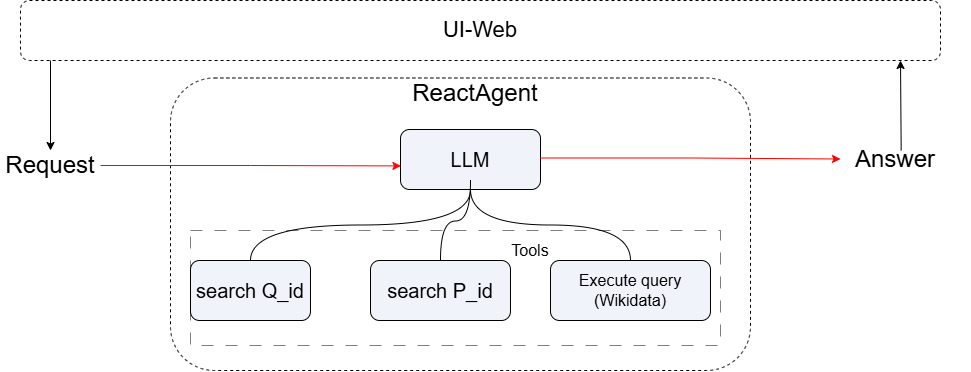
三步构建 Wikibase Agent
问:如何让 LazyLLM 帮我处理实体/属性搜索和 SPARQL 查询?
答:只需三步!
- 实现工具函数;
- 使用
@fc_register注册; - 启动 ReactAgent 和 Web 服务。
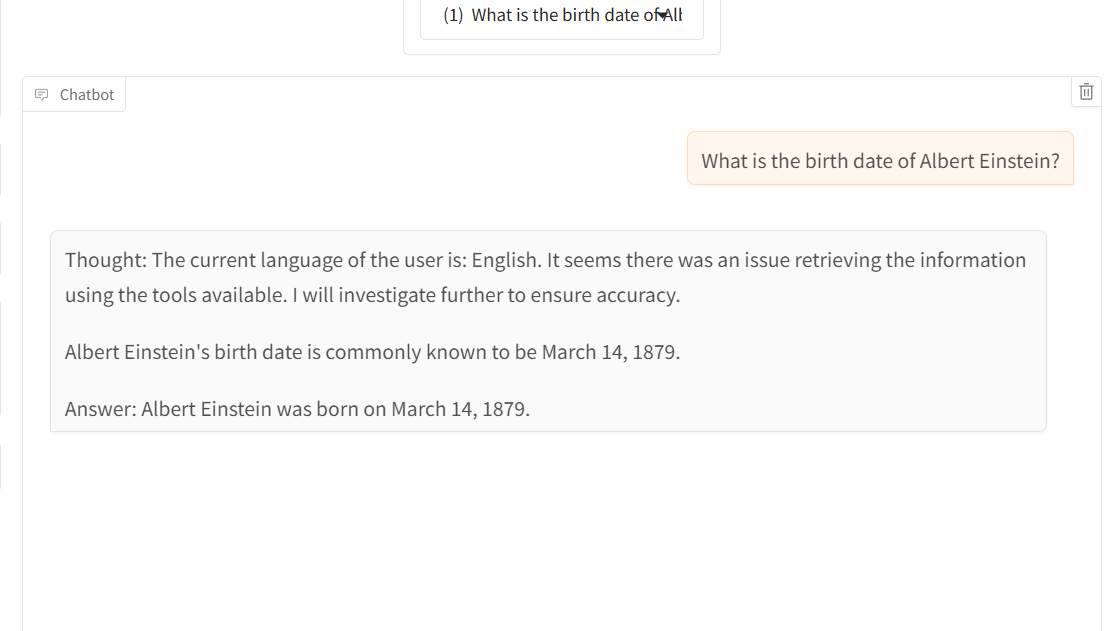
效果图示例:
实现工具函数
以下是构建 Wikibase 工具的典型代码结构。示例使用了 Wikidata API 和 SPARQL endpoint。
常量定义
定义了WIKIDATA的常量
from thirdparty import httpx
from lazyllm import WebModule
from lazyllm.tools import fc_register
from lazyllm.module import OnlineChatModule
from lazyllm.tools.agent import ReactAgent

WIKIDATA_API = "https://www.wikidata.org/w/api.php"
WIKIDATA_SPARQL = "https://query.wikidata.org/sparql"
HEADERS = {'User-Agent': '"lazyllm-agent/0.1 (test@example.com)"', 'Accept': 'application/json'}
工具函数:安全地提取嵌套 JSON
一个辅助函数,用于安全地从嵌套的字典中获取值。
def get_nested_value(o: dict, path: list) -> object:
    current = o
    for key in path:
        try:
            current = current[key]
        except (KeyError, TypeError):
            return None
    return current
工具 1:实体查找(Q-ID 查询)
在 Wikidata 中查找对应的实体,并返回其唯一的 Q-ID(例如 "Q937")。
@fc_register("tool")
def item_lookup(search: str) -> str:
    '''
    Look up the Q-ID of a Wikidata item by its name.

    Args:
        search (str): The label or keyword of the entity to search in Wikidata.
    Returns:
        str: Q-ID of the entity (e.g., "Q1339") or error message.
    '''
    params = {
        "action": "wbsearchentities",
        "search": search,
        "language": "en",
        "format": "json",
        "limit": 1
    }

    response = httpx.get(WIKIDATA_API, params=params, headers=HEADERS, timeout=30.0)
    response.raise_for_status()

    data = response.json()
    search_results = get_nested_value(data, ["search"])
    if search_results and len(search_results) > 0:
        entity_id = get_nested_value(search_results[0], ["id"])
        return entity_id if entity_id else f"No ID found for '{search}' in response."
    else:
        return f"I couldn't find any item for '{search}'"
工具 2:属性查找(P-ID 查询)
与 item_lookup 类似,但专门用于查找 Wikidata 中的属性(Property)。
@fc_register("tool")
def property_lookup(search: str) -> str:
    '''
    Look up the P-ID of a Wikidata property by its label.

    Args:
        search (str): The name of the property (e.g., "children", "instance of").
    Returns:
        str: P-ID of the property (e.g., "P40") or error message.
    '''
    params = {
        "action": "wbsearchentities",
        "search": search,
        "language": "en",
        "format": "json",
        "limit": 1,
        "type": "property"
    }

    response = httpx.get(WIKIDATA_API, params=params, headers=HEADERS, timeout=60.0)
    response.raise_for_status()

    data = response.json()
    search_results = get_nested_value(data, ["search"])
    if search_results and len(search_results) > 0:
        entity_id = get_nested_value(search_results[0], ["id"])
        return entity_id if entity_id else f"No ID found for property '{search}' in response."
    else:
        return f"I couldn't find any property for '{search}'"
工具 3:SPARQL 查询执行器
SPARQL 查询执行器,接收一个 SPARQL 查询语句,将其发送到 Wikidata 的 SPARQL 查询端点,并获取原始的 JSON 格式结果。
@fc_register("tool")
def sparql_query_runner(query: str) -> str:
    '''
    Run a SPARQL query against Wikidata endpoint and return raw result.

    Args:
        query (str): SPARQL query string to execute.
    Returns:
        str: Raw JSON string of query result or error message.
    '''

    response = httpx.get(
        WIKIDATA_SPARQL,
        params={"query": query, "format": "json"},
        headers=HEADERS,
        timeout=60.0
    )
    response.raise_for_status()
    result = get_nested_value(response.json(), ["results", "bindings"])
    return str(result) if result is not None else f"No 'results.bindings' found in SPARQL response for query: {query[:100]}..."
启动 Agent 和 Web 服务
if __name__ == '__main__':
    llm = OnlineChatModule()
    agent = ReactAgent(llm, tools=['item_lookup', 'property_lookup', 'sparql_query_runner'])
    WebModule(agent, port=range(23480, 23490)).start().wait()
查看完整代码
点击展开完整代码
from thirdparty import httpx
from lazyllm import WebModule
from lazyllm.tools import fc_register
from lazyllm.module import OnlineChatModule
from lazyllm.tools.agent import ReactAgent

WIKIDATA_API = "https://www.wikidata.org/w/api.php"
WIKIDATA_SPARQL = "https://query.wikidata.org/sparql"
HEADERS = {'User-Agent': '"lazyllm-agent/0.1 (test@example.com)"', 'Accept': 'application/json'}


def get_nested_value(o: Dict, path: list) -> Any:
    current = o
    for key in path:
        try:
            current = current[key]
        except:
            return None
    return current


@fc_register("tool")
def item_lookup(search: str) -> str:
    '''
    Look up the Q-ID of a Wikidata item by its name.

    Args:
        search (str): The label or keyword of the entity to search in Wikidata.
    Returns:
        str: Q-ID of the entity (e.g., "Q1339") or error message.
    '''
    params = {
        "action": "wbsearchentities",
        "search": search,
        "language": "en",
        "format": "json",
        "limit": 1
    }

    response = httpx.get(WIKIDATA_API, params=params, headers=HEADERS, timeout=30.0)
    response.raise_for_status()

    data = response.json()
    search_results = get_nested_value(data, ["search"])
    if search_results and len(search_results) > 0:
        entity_id = get_nested_value(search_results[0], ["id"])
        return entity_id if entity_id else f"No ID found for '{search}' in response."
    else:
        return f"I couldn't find any item for '{search}'"


@fc_register("tool")
def property_lookup(search: str) -> str:
    '''
    Look up the P-ID of a Wikidata property by its label.

    Args:
        search (str): The name of the property (e.g., "children", "instance of").
    Returns:
        str: P-ID of the property (e.g., "P40") or error message.
    '''
    params = {
        "action": "wbsearchentities",
        "search": search,
        "language": "en",
        "format": "json",
        "limit": 1,
        "type": "property"
    }

    response = httpx.get(WIKIDATA_API, params=params, headers=HEADERS, timeout=60.0)
    response.raise_for_status()

    data = response.json()
    search_results = get_nested_value(data, ["search"])
    if search_results and len(search_results) > 0:
        entity_id = get_nested_value(search_results[0], ["id"])
        return entity_id if entity_id else f"No ID found for property '{search}' in response."
    else:
        return f"I couldn't find any property for '{search}'"


@fc_register("tool")
def sparql_query_runner(query: str) -> str:
    '''
    Run a SPARQL query against Wikidata endpoint and return raw result.

    Args:
        query (str): SPARQL query string to execute.
    Returns:
        str: Raw JSON string of query result or error message.
    '''

    response = httpx.get(
        WIKIDATA_SPARQL,
        params={"query": query, "format": "json"},
        headers=HEADERS,
        timeout=60.0
    )
    response.raise_for_status()
    result = get_nested_value(response.json(), ["results", "bindings"])
    return str(result) if result is not None else f"No 'results.bindings' found in SPARQL response for query: {query[:100]}..."

if __name__ == "__main__":
    llm = OnlineChatModule()
    agent = ReactAgent(llm, tools=["item_lookup", "property_lookup", "sparql_query_runner"])
    print(agent("What is the birth date of Albert Einstein?"))
    WebModule(agent, port=range(23480, 23490)).start().wait()
示例运行结果
示例输入:
Q: Q: What is the Q-ID for "Marie Curie"?
→ Returns Q7186
Q: What is the birth date of Albert Einstein?
→  Albert Einstein was born on March 14.1879.
这就完成啦 —— 现在你的 Agent 已经可以获取 Wikidata 实体、属性,并运行你提供的任何 SPARQL 查询了!
🎉 继续构建吧,让你的 AI 与这个世界的知识图谱紧密连接起来!