基于LazyLLM的模拟环境交互
在许多LLM代理的应用中,Agent需要与真实世界交互,例如访问互联网、数据库或执行代码(REPL)。但为了便于开发和测试,我们也可以构建模拟环境——比如文字冒险游戏——让Agent在其中进行决策和互动。本教程将展示如何使用 LazyLLM 结合 Gymnasium Blackjack-v1 环境,搭建一个简单的文本交互环境,并实现Agent与环境之间的循环对话与响应机制。
通过本节您将学习到 LazyLLM 的以下要点
- 如何结合 ReactAgent控制环境
- 如何通过 @fc_register 注册环境操作工具
功能简介
这是一个21点游戏,玩家和庄家比谁的手牌点数更接近21,但不能超过。玩家可以随时选择“要牌”(抽一张)或“停牌”(停止抽牌)。庄家则按固定规则:点数低于17必须要牌,17及以上必须停牌。A牌比较特殊,可以算作1点或11点,系统会优先按11点计算,但如果算11会爆牌(超过21),就自动降为1点,避免输掉。如果手牌中包含一张被当作11点使用的A(Ace),则称为“软牌”(soft hand)。如果A被当作1点使用,则称为“硬牌”(hard hand)。如果玩家爆牌(超过21)就输,庄家爆牌就赢,都没爆就比点数大小。Gymnasium环境扮演庄家,Agent扮演玩家与环境交互,通过调用工具决定要牌还是停牌,让它学会在 21 点游戏中做出合理决策。
游戏中使用的具体功能如下:
- 自动初始化
Gymnasium黑杰克游戏环境Blackjack-v1,并管理全局状态(观察值、回报、终止状态等)。 - 注册三个工具函数
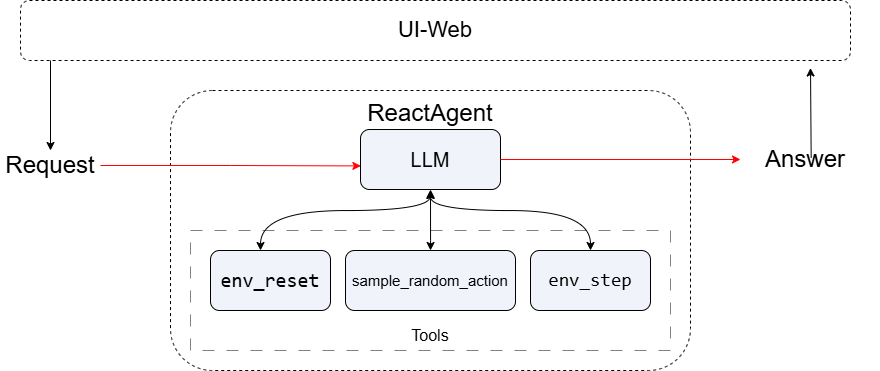
env_reset、env_step和sample_random_action,通过fc_register暴露为可被 LLM 调用的函数接口,支持环境重置、动作执行与随机动作采样。 - 使用
ReactAgent构建对话式智能代理,实现自然语言控制环境的交互式推理。 - 通过安全封装
safe_agent_call,增强鲁棒性,自动处理非结构化响应或异常。
设计思路
首先,系统创建Blackjack-v1游戏环境并初始化全局状态变量。接着,系统构建一个基于LLM的ReactAgent,为其提供已注册的环境操作工具列表。然后,进入智能体与环境的交互循环:在每轮交互中,Agent根据当前状态和系统提示调用相应工具(如先采样随机动作,再执行步进),系统捕获Agent的响应并解析其输出的动作指令。
代码实现
项目依赖
安装 lazyllm:
导入相关包:
import gymnasium as gym
from typing import Any, Dict
import lazyllm
from lazyllm.tools import fc_register, ReactAgent
创建 Blackjack 环境
Blackjack-v1 是 OpenAI Gym 的一个环境,模拟了 Blackjack(二十一点),这是一个经典的21点纸牌游戏环境。玩家的目标是让手牌点数尽可能接近21点但不超过,通过“要牌”或“停牌”与庄家比拼点数大小来决定输赢。
# 创建 Blackjack 环境
env = gym.make('Blackjack-v1')
obs, info = env.reset()
# 全局状态变量
current_obs = obs
total_return = 0.0
terminated = False
truncated = False
步骤详解
Step1: 重置环境
env_reset 函数用于重置Blackjack-v1到初始状态。reset 方法获取初始观测和信息,然后更新全局变量,并返回一个包含初始观测、奖励、终止/截断标志和总回报的字典。
@fc_register('tool')
def env_reset() -> Dict[str, Any]:
    '''
    Reset the environment and return the initial observation.
    Returns:
        Dict[str, Any]: The initial observation and other info.
    '''
    global current_obs, total_return, terminated, truncated
    obs, info = env.reset()
    current_obs = obs
    total_return = 0.0
    terminated = False
    truncated = False
    return {
        'observation': obs,
        'reward': 0.0,
        'termination': terminated,
        'truncation': truncated,
        'return': total_return
    }
Step2: 执行动作
env_step 函数用于执行一个动作(action)。首先检查当前回合是否已经结束,如果已结束,则返回当前状态和一个错误信息。如果回合未结束,则调用底层环境的 step 方法来执行动作。
@fc_register('tool')
def env_step(action: int) -> Dict[str, Any]:
    '''
    Take an action in the environment.
    Args:
        action (int): The action to take.
    Returns:
        Dict[str, Any]: The new observation, reward, termination, truncation, and return.
    '''
    global current_obs, total_return, terminated, truncated
    if terminated or truncated:
        return {
            'observation': current_obs,
            'reward': 0.0,
            'termination': terminated,
            'truncation': truncated,
            'return': total_return,
            'error': 'Cannot step after episode termination'
        }

    obs, reward, terminated, truncated, info = env.step(action)
    current_obs = obs
    total_return += reward
    return {
        'observation': obs,
        'reward': float(reward),
        'termination': terminated,
        'truncation': truncated,
        'return': float(total_return)
    }
Step3: 随机动作采样
sample_random_action 的函数,从Blackjack-v1环境中随机抽取一个动作。
@fc_register('tool')
def sample_random_action() -> Dict[str, Any]:
    '''
    Sample a random action from the environment's action space.
    Returns:
        Dict[str, Any]: The sampled action.
    '''
    action = env.action_space.sample()
    return {'action': int(action)}
Step4: 定义 LLM 并创建 Agent
调用ReactAgent并传入llm和tools实现Agent的构建。
llm = lazyllm.OnlineChatModule()

system_prompt = '''
You are controlling a gymnasium environment.
- Use env_reset() to start a new game.
- Use sample_random_action() to get an action, then env_step(action) to take it.
- **If termination is true, do NOT call env_step again.**
- Always output EXACTLY in this format:
Observation: [x, y, z]
Reward: x.x
Termination: true/false
Truncation: true/false
Return: x.x
Action: 0 or 1
'''
agent = ReactAgent(
    llm,
    ['env_reset', 'env_step', 'sample_random_action'],
    prompt=system_prompt
)
完整代码
点击展开/折叠 Python代码
import gymnasium as gym
from typing import Any, Dict
import lazyllm
from lazyllm.tools import fc_register, ReactAgent

env = gym.make('Blackjack-v1')
obs, info = env.reset()
current_obs = obs
total_return = 0.0
terminated = False
truncated = False


@fc_register('tool')
def env_reset() -> Dict[str, Any]:
    '''
    Reset the environment and return the initial observation.
    Returns:
        Dict[str, Any]: The initial observation and other info.
    '''
    global current_obs, total_return, terminated, truncated
    obs, info = env.reset()
    current_obs = obs
    total_return = 0.0
    terminated = False
    truncated = False
    return {
        'observation': obs,
        'reward': 0.0,
        'termination': terminated,
        'truncation': truncated,
        'return': total_return
    }


@fc_register('tool')
def env_step(action: int) -> Dict[str, Any]:
    '''
    Take an action in the environment.
    Args:
        action (int): The action to take.
    Returns:
        Dict[str, Any]: The new observation, reward, termination, truncation, and return.
    '''
    global current_obs, total_return, terminated, truncated
    if terminated or truncated:
        return {
            'observation': current_obs,
            'reward': 0.0,
            'termination': terminated,
            'truncation': truncated,
            'return': total_return,
            'error': 'Cannot step after episode termination'
        }

    obs, reward, terminated, truncated, info = env.step(action)
    current_obs = obs
    total_return += reward
    return {
        'observation': obs,
        'reward': float(reward),
        'termination': terminated,
        'truncation': truncated,
        'return': float(total_return)
    }


@fc_register('tool')
def sample_random_action() -> Dict[str, Any]:
    '''
    Sample a random action from the environment's action space.
    Returns:
        Dict[str, Any]: The sampled action.
    '''
    action = env.action_space.sample()
    return {'action': int(action)}


llm = lazyllm.OnlineChatModule()

system_prompt = '''
You are controlling a gymnasium environment.
- Use env_reset() to start a new game.
- Use sample_random_action() to get an action, then env_step(action) to take it.
- **If termination is true, do NOT call env_step again.**
- Always output EXACTLY in this format:
Observation: [x, y, z]
Reward: x.x
Termination: true/false
Truncation: true/false
Return: x.x
Action: 0 or 1

'''

agent = ReactAgent(
    llm,
    ['env_reset', 'env_step', 'sample_random_action'],
    prompt=system_prompt
)


def safe_agent_call(prompt: str):
    '''
    Safely invoke the ReactAgent, automatically retrying or skipping invalid responses.
    '''
    try:
        resp = agent(prompt)
        if isinstance(resp, str) and 'Observation' not in resp:
            print(f'⚠️ Unexpected response format: {resp}')
        return resp
    except Exception as e:
        print(f'⚠️ Agent call failed: {e}')
        env_reset()
        return {'error': str(e)}


if __name__ == '__main__':
    obs = safe_agent_call('Please reset the environment first.')
    print(obs)
    step_count = 0
    max_steps = 5
    while step_count < max_steps:
        if terminated or truncated:
            print('Game has ended. Stopping.')
            break

        action = safe_agent_call('Please choose a random action and take a step.')
        print(action)
        if isinstance(action, dict) and action.get('error'):
            print('⚠️ Encountered error, retrying...')
            continue

        step_count += 1
输出示例
Gymnasium中Blackjack-v1(21点)游戏环境的交互记录如下
Observation: [14, 10, 0] - 当前玩家手牌点数为14,庄家明牌是10,未使用A作为11点(0表示False)
Reward: 0.0 - 当前无奖励(游戏未结束)
Termination: false - 游戏未结束
Truncation: false  - 未因步数限制而截断
Return: 0.0 - 累计奖励为0

Observation: (20, 7, False) - 玩家继续要牌后点数变为20,庄家明牌是7,仍无软牌(玩家的手牌中没有A,或者虽然有A但已经被当作1点使用)。
Reward: 0.0 - 游戏仍在进行中
Termination: False - 游戏未结束
Truncation: False - 正常进行
Return: 0.0 - 累计奖励为0

Observation: (21, 7, False) - 玩家再要一张牌后达到21点,庄家明牌是7
Reward: 1.0 - 获得+1奖励(21点获胜)
Termination: True - 游戏结束(获胜)
Truncation: False - 非截断结束
Return: 1.0 - 最终累计奖励为1
结语
本教程展示了如何使用 LazyLLM 构建一个环境交互 Agent,适用于游戏策略模拟、环境控制实验、自动化决策研究等场景。通过组合 fc_register、OnlineChatModule 与 ReactAgent,你可以快速搭建能理解自然语言指令、动态调用环境工具并进行多轮推理的智能代理系统,实现“语言即接口”的人机协同交互范式。