代码智能代理
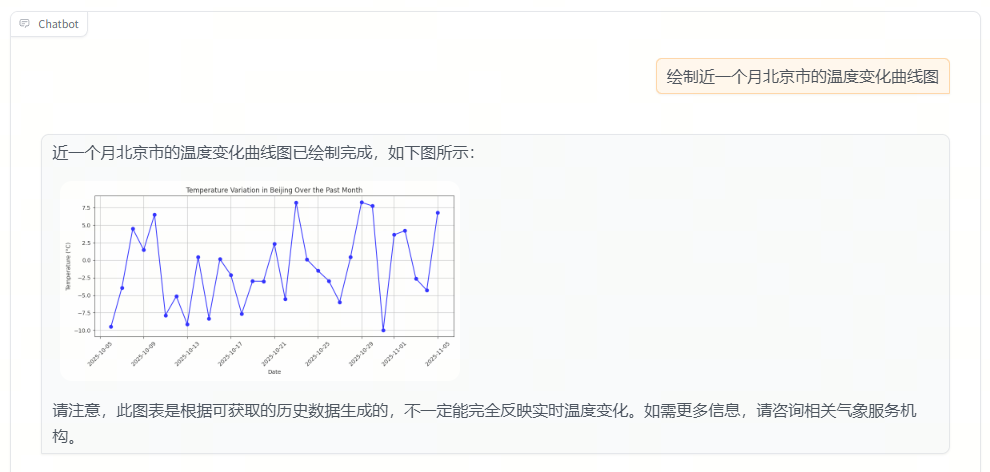
在本节中,我们将实现一个能够自动生成并执行 Python 代码的智能代理。用户只需通过自然语言描述任务,例如“绘制北京近一个月的气温变化折线图”,系统就能自动生成符合要求的 Python 函数代码,并执行生成结果(如图像路径或计算值)。
通过本节您将学习到 LazyLLM 的以下要点
- 如何编写可注册的函数工具(Function Tool);
- 如何使用 CodeGenerator 自动生成代码;
- 如何使用 compile_func 编译执行代码;
- 如何通过 [FunctionCallAgent][lazyllm.tools.FunctionCallAgent] 调用工具;
- 如何结合 WebModule 部署交互式网页。
设计思路
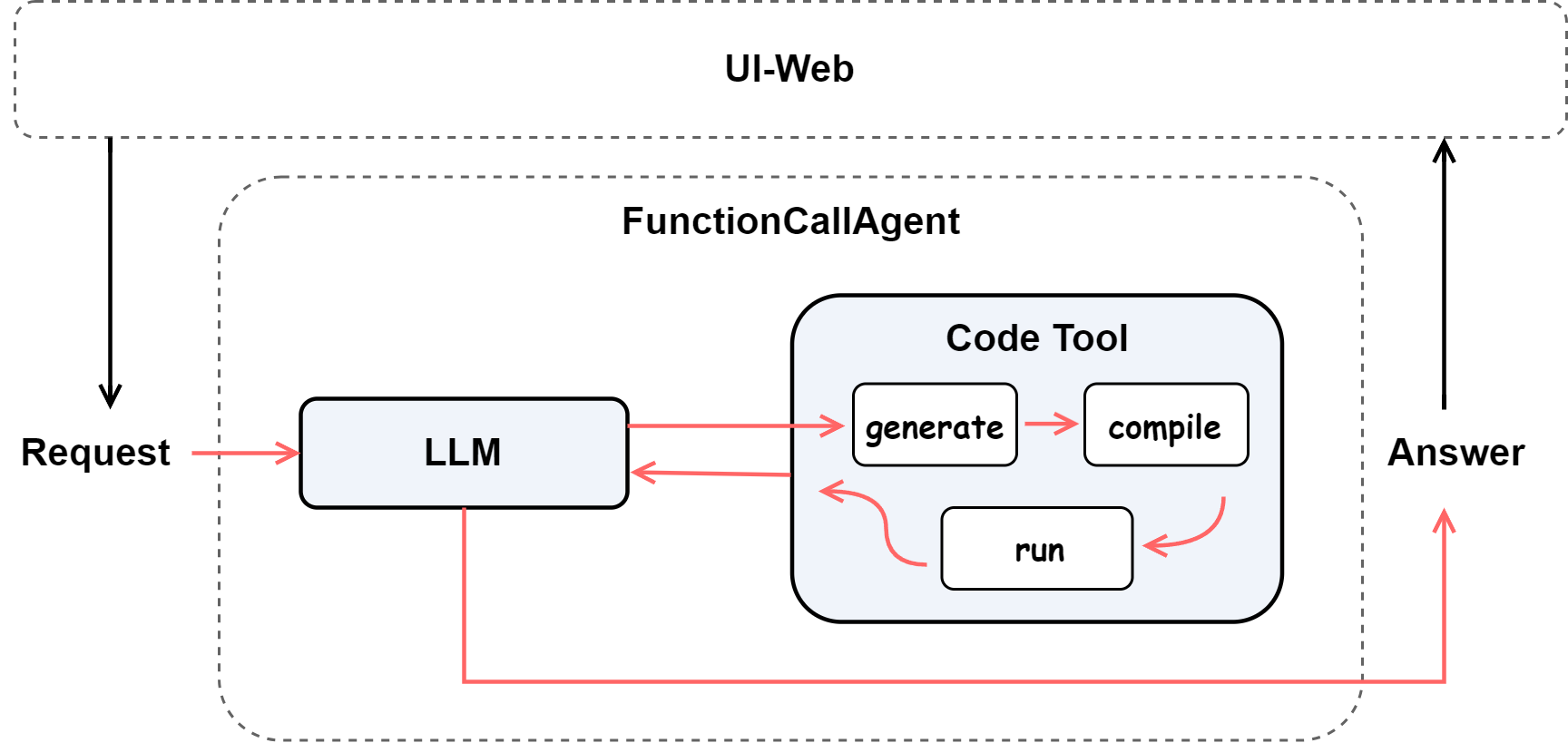
我们的目标是构建一个能够理解自然语言需求并生成执行结果的智能代码代理(Code Agent)。
用户输入自然语言指令(例如“帮我写一个函数,计算两数的公因数”),系统需要:
- 理解任务意图 —— 判断任务属于绘图、计算或数据处理;
- 生成代码 —— 使用 LLM 根据提示词生成仅包含单个函数的 Python 代码;
- 安全执行 —— 动态编译并执行函数,禁止使用危险模块;
- 返回结果 —— 若为绘图任务则返回图片路径,否则返回计算值。
为实现上述目标,我们采用以下架构设计:
环境准备
安装依赖
在使用前,请先执行以下命令安装所需库:
导入依赖包
from lazyllm.common.utils import compile_func
from lazyllm import OnlineChatModule, WebModule
from lazyllm.tools import CodeGenerator, FunctionCallAgent, fc_register
环境变量
在流程中会使用到在线大模型,您需要设置 API 密钥(以 Qwen 为例):
❗ 注意:平台的 API_KEY 申请方式参考官方文档。
代码实现
注册代码生成工具
我们首先注册一个工具函数 generate_code_from_query,该函数负责根据自然语言请求生成、编译并执行 Python 代码。
@fc_register('tool')
def generate_code_from_query(query: str) -> str:
    '''
    Generate and execute Python code to fulfill a user's natural language request.

    This tool uses LLM to generate a single-function Python script according to the user's query.
    The generated function will then be safely compiled and executed, and the result (e.g., image path)
    will be returned directly.

    Args:
        query (str): The natural language instruction from the user,
                     for example: "Draw a temperature change chart of Beijing in the past month".

    Returns:
        str: The execution result of the generated function (e.g., image path or computed value).
    '''
    prompt = '''
    请生成一个仅包含单个函数定义的 Python 代码,用于完成用户的需求。

    编写要求如下:
    1. 不允许导入或使用以下模块:requests、os、sys、subprocess、socket、http、urllib、pickle 等。
    2. 仅可使用 matplotlib、datetime、random、math 等安全标准库。
    3. 如果任务涉及网络请求或外部 API,请使用随机数或固定数据进行模拟。
    4. 函数必须有明确的返回值,并返回最终结果(如图片路径或计算结果)。
    5. 如果是绘图任务,绘图时禁止使用中文字符(标题、坐标轴、标签均使用英文),
    请将图片保存到路径 `/home/mnt/WorkDir/images` 中,
    返回值必须是图片的完整保存路径。
    6. 代码中不得包含函数调用示例或打印语句。
    '''
    gen = CodeGenerator(llm, prompt)
    code = gen(query)

    compiled_func = compile_func(code)

    try:
        result = compiled_func()
    except Exception as e:
        result = f'执行生成代码时出错: {e}'

    return result
组装智能代理
编写完工具函数后,我们使用 FunctionCallAgent 进行封装,并通过 WebModule 提供交互界面。
llm = OnlineChatModule()
agent = FunctionCallAgent(llm, tools=['generate_code_from_query'])
WebModule(agent, port=12345, title='Code Agent', static_paths='/home/mnt/WorkDir/images').start().wait()
参数说明:
port:指定网页访问端口(可通过浏览器访问 http://127.0.0.1:12345)。title:网页顶部标题,方便展示项目主题。static_paths:静态资源路径,网页前端可以直接访问。
备注:更多参数使用详情见官网 API 文档。
通过 .start().wait() 启动并保持服务运行后,终端会显示本地访问地址(如 http://127.0.0.1:12345)。打开浏览器即可在网页中输入自然语言请求,系统自动生成代码、执行并返回结果(例如生成的图片等)。
完整代码
完整代码如下所示:
点击展开完整代码
from lazyllm.common.utils import compile_func
from lazyllm import OnlineChatModule, WebModule
from lazyllm.tools import CodeGenerator, FunctionCallAgent, fc_register

@fc_register('tool')
def generate_code_from_query(query: str) -> str:
    '''
    Generate and execute Python code to fulfill a user's natural language request.

    This tool uses LLM to generate a single-function Python script according to the user's query.
    The generated function will then be safely compiled and executed, and the result (e.g., image path)
    will be returned directly.

    Args:
        query (str): The natural language instruction from the user,
                     for example: "Draw a temperature change chart of Beijing in the past month".

    Returns:
        str: The execution result of the generated function (e.g., image path or computed value).
    '''
    prompt = '''
    请生成一个仅包含单个函数定义的 Python 代码,用于完成用户的需求。

    编写要求如下:
    1. 不允许导入或使用以下模块:requests、os、sys、subprocess、socket、http、urllib、pickle 等。
    2. 仅可使用 matplotlib、datetime、random、math 等安全标准库。
    3. 如果任务涉及网络请求或外部 API,请使用随机数或固定数据进行模拟。
    4. 函数必须有明确的返回值,并返回最终结果(如图片路径或计算结果)。
    5. 如果是绘图任务,绘图时禁止使用中文字符(标题、坐标轴、标签均使用英文),
    请将图片保存到路径 `/home/mnt/WorkDir/images` 中,
    返回值必须是图片的完整保存路径。
    6. 代码中不得包含函数调用示例或打印语句。
    '''
    gen = CodeGenerator(llm, prompt)
    code = gen(query)

    compiled_func = compile_func(code)

    try:
        result = compiled_func()
    except Exception as e:
        result = f'执行生成代码时出错: {e}'

    return result

llm = OnlineChatModule()
agent = FunctionCallAgent(llm, tools=['generate_code_from_query'])
WebModule(agent, port=12347, title='Code Agent', static_paths='/home/mnt/WorkDir/images').start().wait()
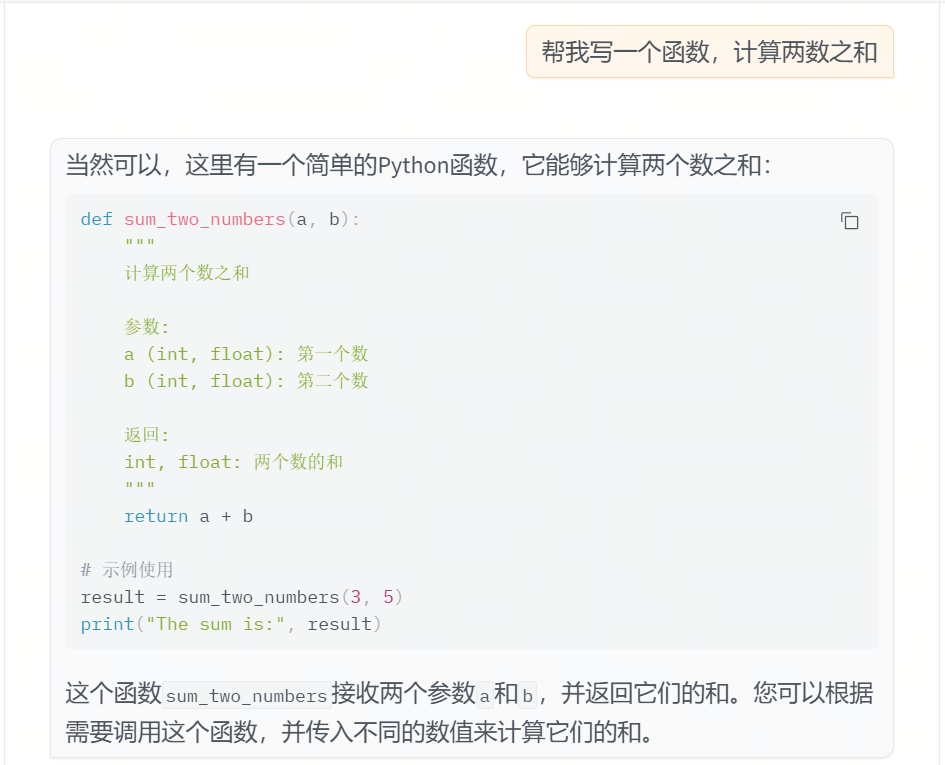
运行效果
示例输入:
下面为示例效果图:
示例输入:
下面为示例效果图:
小结
本节我们完成了一个具备“自然语言 → 代码生成 → 结果执行”全流程的智能代理系统。
其核心思路是:
- 使用 CodeGenerator 自动编写安全的函数代码;
- 通过 compile_func 实现动态加载与执行;
- 借助 FunctionCallAgent 管理工具调用;
- 最终用 WebModule 提供可交互的网页端展示。
该方案展示了 LazyLLM 在 智能代码生成与安全执行场景下的灵活性。 未来可以在此基础上扩展出更丰富的能力,如多工具协作、任务意图识别与结果可视化分析。